

Make a note of the following information
- Laptop make and model
- The voltage (V), current (A) and the manufacturer’s reference (shown on the charger)
E.g.: DC or OUTPUT 18 V 4.7 A
Note: a difference of 2 volts (either + or -) is not a problem
Work out the connector size
Hold the connector (the plug that goes into the laptop) facing you.
Then, using a ruler, measure its outer and inner diameters.
E.g.: 5.5-2.5 connector:
- 5.5 = 5mm,5 = outer diameter
2.5 = 2mm,5 = inner diameter
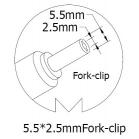
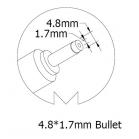
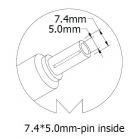
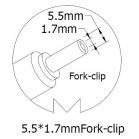
The different laptop charger connectors
| Laptop brand | Laptop connector size in mm |
| 5.5-2.5 | |
| 4.8-1.7 | |
| Blue 4.5 * 3.0 | |
| 4.0 * 1.7 | |
| 7.4-5.0 | |
| 5.5-2.5 | |
| 5.5-1.7 | |
| 3.0 *1.0 | |
| 5.5-2.5 | |
| 7.4-5.0 | |
| Black 4.5 * 3.0 | |
| 5.5-2.5 | |
| 6.3-3.0 | |
| 5.5-2.5 | |
| 7.9-5.4 | |
| Yellow rectangular | |
| 6.5-4.4 | |
| 5.5-2.5 | |
| 6.5-4.4 | |
| 5.5-3.0 |
