
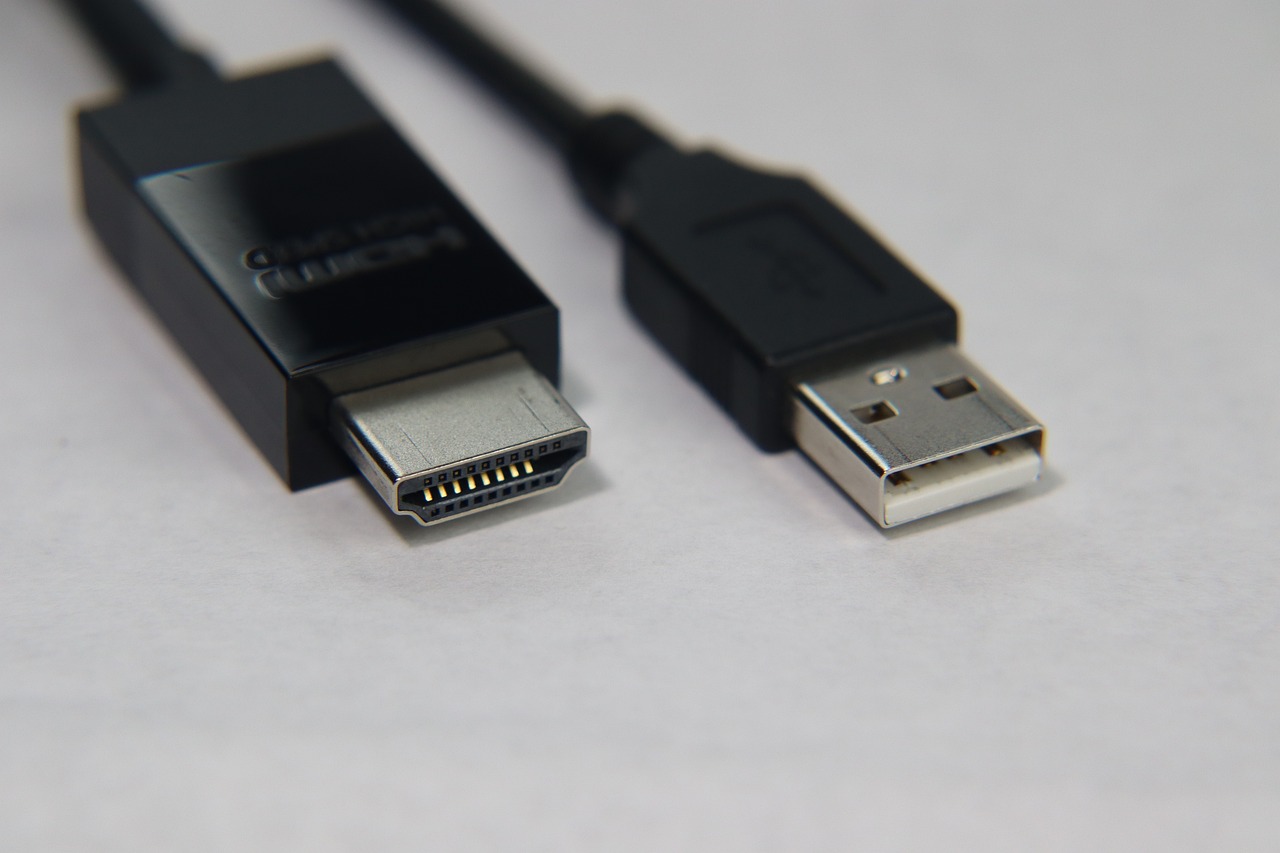
DisplayPort and HDMI are two different standards for transmitting video and audio signals from a player to a screen. But what is the difference between DisplayPort and HDMI, apart from the clearly different connectors? After all, they were designed to do the same thing, weren’t they? In this article, we try to give you some pointers…
The history of technology offers plenty of examples of multiple competing standards that were on the market at the same time. Just think of the video recorder format war in the early 1980s between Video 2000, VHS and Betamax. For the younger among us, VHS eventually won, mainly due to its lower cost and the support it received from the adult film industry. More recently there was the battle between Blu-ray and HD DVD.
DisplayPort or HDMI: which is which?
Is there a format war between DisplayPort and HDMI? Not really. Although HDMI and DisplayPort have the same goal, they were in fact designed under different constellations.
The HDMI interface (short for High-Definition Multimedia Interface) was introduced in 2003 by a consortium of (mainly) display manufacturers including Sony, Philips, Panasonic and Toshiba. These are large companies primarily targeting image‑focused consumer applications. That’s why you’ll most often find HDMI ports on devices such as TVs, games consoles, projectors and home computers.
A few years later (2006), another major consortium of PC and chip manufacturers worked on creating DisplayPort (DP), a successor to the older VGA and DVI standards. The primary target was computer monitors, graphics cards and professional IT equipment – in other words, more data‑centred markets.
Connectors: the difference of one pin
The 19‑pin HDMI connectors actually come in five forms, but only three of these are commonly used:
- the well‑known Type A (standard HDMI, mainly used for TVs, projectors and laptops),
- Type C (mini HDMI, commonly used on tablets and some laptops)
- Type D (micro HDMI, for tablets and smartphones).
The lesser‑known Type B (29 pins) is used for dual‑link applications, while Type E has a locking tab that prevents the cable from vibrating loose in automotive applications. Other HDMI connectors usually rely on friction to keep the plug in the socket, although locking mechanisms are sometimes used to stop the cable working loose. Such mechanisms are far more common in DisplayPort solutions.
DisplayPort connectors have 20 pins
Two sizes are available: standard DisplayPort and a smaller alternative created by Apple, called Mini DisplayPort. This is the same port as Thunderbolt.
Although most full‑size DisplayPort connectors have a locking mechanism that stops them being disconnected accidentally, this feature is not required by the official specification.
Resolution and bandwidth
Each new version of the HDMI and DisplayPort standards generally introduces some minor new features, as well as higher resolution and bandwidth.
However, this does not mean that a new display is always compatible with the latest version of the standard. There is little point in including a standard that supports 8K resolution on an HD screen. The most important thing is that the standard matches the needs of the display. If it doesn’t, you’ll end up paying more for something you can’t use.
The most common version in use today (for video wall screens), DisplayPort 1.2, supports video resolutions up to 3840 x 2160 pixels at a refresh rate of 60 Hz. The official name for this resolution is UHD, but the term 4K is also often used. In the film industry, 4K actually implies a resolution of 4096 x 2160. It also supports all common 3D video formats. The maximum bandwidth that can be sent over a DP 1.2 cable is 17.28 Gbps. DisplayPort 1.4, which supports 5120 x 2800 @60Hz with a bandwidth of 25.92 Gbps, is becoming more and more popular.
The most widely used HDMI version, HDMI 2.0, offers UHD resolution at 60 Hz and a bandwidth of 14.4 Gbps. In other words, it is more important to look at the version number (both on the source and on the display) than to simply compare DisplayPort and HDMI.
It is more important to look at the version number (both on the source and on the display) than to compare DisplayPort and HDMI.
In the meantime, the HDMI 2.1 standard has been launched, supporting 4K at 120 Hz or 8K at 60 Hz, and offering speeds of 48 Gbps. Although not yet widespread, this standard is already used in some high‑end models (for example, gaming monitors). DisplayPort 2.0, which offers a resolution of 10,240 x 4320 and a bandwidth of 77.4 Gbps, is also available, but there are currently no models on the market that use it.
Audio features: facing the music
HDMI and DisplayPort both support up to 8 channels of 24‑bit, 192 kHz digital audio.
The main difference is that the HDMI standard includes an Audio Return Channel (ARC). This means that not only can the source device (usually an AV receiver) send audio to the TV, but sound can also travel in the opposite direction. This can be used when the TV has a built‑in broadcast receiver (for example, when you watch Netflix on a smart TV), but you don’t want to listen via the TV’s built‑in speakers and instead prefer the surround‑sound system of the AV receiver. While this is an interesting use case in consumer electronics, it is virtually never used in professional AV display setups.
Cable length: how far can you go?
Different HDMI cable standards are available on the market, but the typical cable you’ll find today is certified as “high‑speed” HDMI. Unfortunately, as is often the case with cheap consumer kit, not all high‑speed HDMI cables deliver the required quality. Poor‑quality cables can cause many problems, such as artefacts and noise.
The HDMI standard does not really define a maximum cable length. Instead, it describes a performance specification from which the cable length can be derived. As a rule, HDMI cables are fairly short. In TV and projector installations it’s very rare for the display and the source to be more than 2 metres apart.
For longer distances, you can use a signal amplifier or an active cable that boosts the signal. Note that HDMI signals can also run over CAT 5 or CAT 6 cable (up to 50 metres), over coaxial cable (up to 90 metres) or over fibre optic (more than 100 metres). A passive copper DisplayPort cable transmits very high data rates, up to 4K resolution, over a distance of 2 metres. If you need to cover a distance of up to 15 metres, you are limited to a resolution of 1080p according to the specification. However, many tests show that higher resolutions are also possible. An active copper DP cable can cover up to 20 metres at a resolution of 2560×1600. For DisplayPort, cables in fibre optic can also cover longer distances.
